


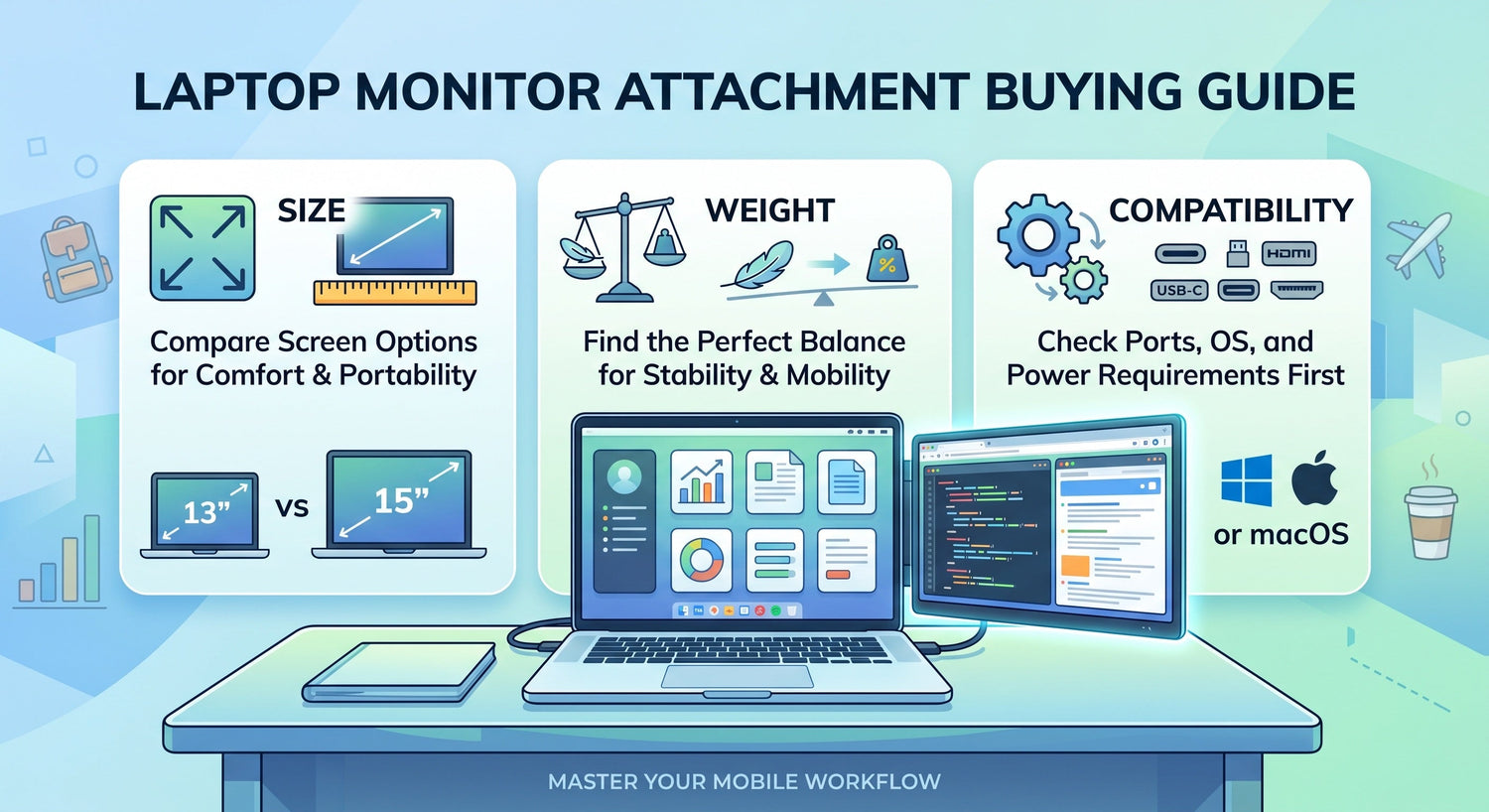
A laptop monitor attachment can be a practical way to add screen space without carrying a full external monitor setup. For people who work on the go, study in small spaces, or multitask across documents, calls, spreadsheets, and browser tabs, that extra display area can make daily work much easier.
But not every model is equally useful. Some are easier to carry but offer less screen space. Some look convenient until the weight makes the setup awkward. Others seem compatible at first, then require ports, adapters, or software that do not match your laptop. That is why the smartest way to compare a laptop monitor attachment is to start with three factors that affect real-world use most: size, weight, and compatibility.
This guide explains what to check before buying, what common mistakes to avoid, and how to choose the right setup for your laptop and workflow.
What Is a Laptop Monitor Attachment?
A laptop monitor attachment is an external display designed to connect directly to a laptop and expand the available screen area. Unlike a standard desktop monitor, it is made for portability. Unlike many separate portable displays, it is often designed to stay attached to the laptop body or screen area during use, creating a more integrated multi-screen setup.
You may also see similar products described as:
- laptop screen attachment
- monitor attachment for laptop
- laptop monitor extender attachment
- laptop dual screen attachment
- portable laptop monitor attachment
The exact design can vary, but the idea is the same: give laptop users more room to work without relying on a fixed desk monitor.
This kind of setup is especially appealing for:
- remote workers managing calls, documents, and messaging at once
- travelers who need a compact dual-screen setup
- students writing while researching
- analysts working with spreadsheets and dashboards
- programmers using code, terminal, and documentation side by side
The benefit is not just “more screen.” It is smoother workflow, less window switching, and a setup that fits more easily into mobile work routines.
Laptop Monitor Attachment vs Portable Monitor
Many buyers compare a laptop monitor attachment with a portable monitor, and the two do overlap. But they are not the same kind of product.
A portable monitor is usually a separate display placed next to the laptop on a desk or table. It often has its own stand or folio cover and gives you more flexibility in screen positioning.
A laptop monitor attachment is designed to feel more integrated with the laptop. It usually takes up less separate desk space and can be quicker to deploy in temporary work environments.
Choose a laptop monitor attachment if you want:
- a more compact all-in-one setup
- easier use in tight spaces
- fewer separate pieces to arrange
- a better fit for travel, hot desks, and temporary workstations
Choose a portable monitor if you want:
- more freedom in screen placement
- a larger standalone display
- less weight attached to the laptop itself
- a setup mainly used on desks rather than in transit
For buyers who work in cafes, airports, libraries, hotel rooms, or shared office spaces, a portable laptop monitor attachment often makes more sense because it reduces setup clutter and saves space.
Why Size Matters More Than Buyers Expect
Screen size is one of the first things people compare, but it should not be judged by display dimensions alone. The right size affects comfort, portability, balance, and how useful the extra screen actually feels during work.
1. Screen size affects how much work you can see at once
The larger the display area, the easier it becomes to keep multiple windows visible. This matters for tasks like:
- comparing spreadsheets and reports
- writing while referencing source material
- keeping a meeting window open beside notes
- viewing charts while managing orders or messages
- coding with documentation visible at the same time
A laptop monitor extender attachment is most useful when it reduces the need to constantly switch tabs and resize windows. If the added screen is too small for your workflow, it may not deliver much practical value.
2. Bigger screens improve comfort, but reduce portability
Larger displays usually feel better for multitasking, but they also add bulk. A bigger monitor attachment for laptop can be less convenient in a backpack, less comfortable during frequent travel, and harder to use in cramped workspaces.
This is where many buyers make a mistake. They assume the biggest screen will always be best, when in reality the better choice depends on how mobile the setup needs to be.
In general:
- Smaller attachments are better for commuting, travel, and flexible use
- Mid-size attachments offer a balance between portability and usability
- Larger attachments are often better for desk-heavy workflows and longer sessions
3. Laptop size and screen size should feel balanced together
A 16-inch laptop can usually support a larger attached display more naturally than a compact 13-inch machine. Even if a product is technically compatible, the overall setup may feel awkward if the display size is not well matched to the laptop.
Think about it this way:
- 13–14 inch laptops: usually benefit from lighter, more compact attachments
- 15–16 inch laptops: can often handle a wider range of attachment sizes more comfortably
- ultra-thin laptops: may need more careful fit checks around weight and mounting style
A good laptop screen attachment should feel proportionate. It should add workspace without making the laptop look or feel overloaded.
4. The best size depends on where you work
Choose a more compact size if you:
- travel often
- work in small or temporary spaces
- carry your laptop daily
- want faster pack-up and setup
Choose a larger size if you:
- spend long hours working side by side across apps
- mostly work from a desk
- use spreadsheets, dashboards, or code editors often
- care more about workspace comfort than minimal weight
The right size is not just about screen preference. It is about how often you move, where you work, and how important portability is in your day-to-day routine.
Why Weight Can Make or Break the Experience
Weight is one of the most overlooked parts of a laptop monitor attachment purchase. Buyers often focus on display size and forget that the product still needs to be carried, connected, opened, and used regularly.
1. Extra weight changes your daily portability
A product may look compact on a product page but still feel heavy once added to a laptop bag along with a charger, mouse, cables, and other daily items. For commuters and travelers, that added weight matters quickly.
This is especially relevant for:
- frequent flyers
- hybrid workers
- students
- mobile sales teams
- consultants working across locations
A portable laptop monitor attachment should support productivity without making the overall setup inconvenient to carry.
2. Weight also affects stability during use
It is not just about the bag. Added weight can influence how stable the laptop feels when typing, adjusting the screen, or working on smaller surfaces. This becomes more noticeable on lighter laptops.
A poor balance can lead to:
- more screen wobble
- awkward hinge pressure
- a setup that feels less secure
- reduced confidence during daily use
That does not mean every heavier model is bad. It means buyers should think about weight in relation to their laptop size, mounting design, and work environment.
3. Lighter is often better for travel, but not always better overall
A very light model may be easier to carry, but it still needs to be useful once connected. The goal is not simply the lightest product. The goal is a setup that balances screen space, sturdiness, and portability.
A lighter laptop dual screen attachment is usually best if:
- you pack it every day
- you travel frequently
- you use a smaller laptop
- you often work in temporary spaces
A slightly heavier option may still make sense if:
- you mostly work from a desk
- you want more screen space
- you use the setup for longer work sessions
- your laptop is larger and better able to support it
4. Weight matters more for smaller laptops
A weight level that feels manageable on a 16-inch business laptop may feel less comfortable on a smaller ultrabook. This is why buyers should avoid looking at product weight in isolation.
Ask:
- Will this feel balanced on my laptop size?
- Will I carry it daily or only occasionally?
- Will I usually work at a desk or on the go?
- Does portability matter more than a larger screen?
These questions make weight much more practical to evaluate.
Compatibility Explained: What You Need to Check Before Buying
Compatibility is where many buyers run into problems. A product may look ideal in terms of design and screen size, but if it does not match your laptop’s ports, operating system, or form factor, the experience can quickly become frustrating.
Before buying a monitor attachment for laptop, check five things carefully.
1. Laptop size range
Many models are designed for certain laptop size ranges, such as 13–16 inches. Even if a product claims broad support, the actual experience can vary depending on screen thickness, bezel size, lid design, and overall laptop shape.
Check:
- the recommended laptop size range
- whether the mounting system suits your screen shape
- whether your laptop is especially thin or unusually thick
- whether the setup looks visually and physically balanced
A product that technically fits is not always the same as one that fits well.
2. Port compatibility
This is one of the most important checks. Many users assume USB-C means everything will work, but that is not always true. Some USB-C ports support display output, while others are mainly for charging or limited data functions.
Before buying, confirm:
- what ports your laptop has
- whether the product needs USB-C, HDMI, USB-A, or a combination
- whether your USB-C port supports video output
- whether adapters are required
- whether the setup will leave enough ports free for charging or accessories
The cleaner the connection system, the easier the product tends to be in everyday use.
3. Operating system support
Not every laptop monitor extender attachment works equally well across Windows and macOS. Some offer smoother plug-and-play support on one platform than another. Others may need drivers or helper software.
This matters most for:
- MacBook users
- people who switch between work and personal laptops
- users with company-managed devices
- buyers who prefer minimal setup friction
If a product requires software, make sure that software is supported on your operating system and realistic for your work environment.
4. Power requirements
Some laptop monitor attachment models run directly from the laptop connection. Others may need extra power input, especially in multi-screen configurations.
This affects:
- portability
- cable clutter
- battery drain
- ease of use away from power outlets
Ask these questions:
- Can it run from a single connection?
- Does it require an extra cable for power?
- Will it reduce laptop battery life noticeably?
- Is it practical for use while traveling?
A simple power setup often translates to a better travel and remote work experience.
5. Mounting and setup style
Compatibility is not only about electronics. It is also about whether the setup works with your workflow.
Check:
- how the display attaches
- how long setup takes
- whether it is easy to remove and pack
- whether it seems secure on your type of laptop
- whether it works well in tight spaces
A laptop screen attachment should feel convenient enough that you will actually use it regularly.
How to Choose Based on Your Use Case
The best laptop monitor attachment depends on how and where you work. A model that suits a desk-based analyst may not be the best choice for a frequent flyer.
For remote workers
Remote workers often need one screen for meetings and another for documents, browser tabs, project tools, or chat.
Best priorities:
- balanced screen size
- dependable compatibility
- clean connections
- easy daily setup
For travelers and hybrid workers
Travel users need convenience first. Portability, setup speed, and low accessory burden matter more than maximum screen size.
Best priorities:
- lighter weight
- compact dimensions
- strong portability
- broad laptop compatibility
- simple cable management
For students
Students often work in libraries, dorm rooms, and classrooms where desk space is limited.
Best priorities:
- compact form
- low weight
- straightforward connection
- enough screen room for writing and research
For analysts and spreadsheet-heavy users
These users benefit from keeping data visible across multiple windows.
Best priorities:
- comfortable screen size
- stable mounting
- clear layout for multi-window work
- reliable long-session use
For developers and multitaskers
People working across code, documents, preview windows, and communication tools often benefit from a more spacious setup.
Best priorities:
- enough screen area to reduce switching
- good laptop-size balance
- stable everyday usability
- OS and port compatibility confidence
Common Buying Mistakes to Avoid
A few mistakes appear often when buyers choose a laptop dual screen attachment.
Choosing by size alone
A large display can look appealing, but if the setup becomes too heavy or awkward, the extra screen space may not feel worth it.
Ignoring port details
Not every USB-C setup works the same way. Buyers should verify actual display support, not just assume port compatibility.
Overlooking weight balance
A product may be portable in theory but uncomfortable in practice if it feels unbalanced on the laptop.
Forgetting real travel use
Some products look travel-friendly but require too many cables, adapters, or setup steps to feel convenient on the move.
Buying for occasional use instead of everyday use
Think about your normal routine, not just your ideal setup. The best product is the one that fits your real working habits.
A Simple Buying Checklist
Before you buy, make sure you can clearly answer these questions:
| Factor | What to check | Why it matters |
|---|---|---|
| Size | Display size and laptop fit | Affects comfort and portability |
| Weight | Product weight and setup balance | Impacts carrying ease and stability |
| Ports | USB-C, HDMI, adapters, video support | Determines whether it connects smoothly |
| OS support | Windows, macOS, driver needs | Helps avoid setup issues |
| Power | Single-cable or extra power needed | Affects convenience and mobility |
| Mounting | Fit, stability, ease of setup | Influences real daily usability |
This kind of checklist is often more useful than comparing specs line by line without context.
What Creates Long-Term Value
A good laptop monitor attachment should still feel useful after the first week. Long-term value comes from everyday practicality, not just feature count.
Look for a product that offers:
- a screen size that suits your actual work
- weight that fits your daily carry habits
- compatibility confidence with your laptop
- setup that feels quick and repeatable
- a design that supports both mobility and stability
The best buying decision is usually the one that feels easiest to live with over time.
Conclusion
A laptop monitor attachment can be a smart upgrade for people who need more screen space without moving to a full desk monitor setup. It can improve multitasking, reduce constant window switching, and make mobile work more efficient.
But the right choice depends on more than just the display itself. Size affects comfort and usability. Weight affects portability and balance. Compatibility determines whether the setup will actually work smoothly with your laptop, ports, and operating system.
If you travel often, a lighter and simpler setup usually makes more sense. If you work for long stretches with spreadsheets, dashboards, or multiple apps, size may deserve more attention. If your laptop setup is more specific, compatibility should be the first filter before anything else.
The best monitor attachment for laptop users is the one that fits real daily needs, not just the one with the biggest screen or longest feature list.
FAQ
What is a laptop monitor attachment?
A laptop monitor attachment is an external display designed to connect directly to a laptop and expand screen space in a more portable, integrated format than a traditional monitor.
Is a laptop monitor attachment the same as a portable monitor?
Not exactly. A portable monitor is usually a separate display that stands next to the laptop, while a laptop monitor attachment is designed to stay attached or closely integrated with the laptop during use.
What size laptop monitor attachment should I choose?
Choose based on your laptop size and your work style. Smaller options are usually better for travel and portability, while larger options are better for multitasking and longer desk-based sessions.
Does weight matter when choosing a laptop screen attachment?
Yes. Weight affects both carrying comfort and how balanced the setup feels during use, especially on smaller laptops.
Are laptop monitor attachments compatible with MacBook?
Some are, but compatibility varies. Always check operating system support, port requirements, and whether any drivers or adapters are needed.
Do all USB-C laptops support a laptop monitor attachment?
No. Some USB-C ports support video output, while others may only support charging or limited data functions. Always verify the exact port capability before buying.
Is a laptop monitor attachment good for travel?
Yes, many are designed for travel-friendly productivity. The best travel options are usually lighter, compact, and easy to connect without too many extra accessories.
What is more important: size, weight, or compatibility?
All three matter, but compatibility should usually come first. If the product does not work well with your laptop, the right size and weight will not matter.

Leave a comment
This site is protected by hCaptcha and the hCaptcha Privacy Policy and Terms of Service apply.