


Gaming laptops are more powerful than ever. They can run competitive shooters, open-world RPGs, racing simulators, streaming software, Discord, browser guides, music apps, and editing tools. But even the best gaming laptop still has one major limitation: one screen is rarely enough.
Picture this: you are in a ranked match, your teammates are talking on Discord, your stream chat is moving, OBS is running in the background, and you need to check a map or build guide. With only one laptop display, everything competes for space. You end up alt-tabbing, resizing windows, missing messages, or breaking your focus at the worst possible moment.
A triple screen extender for gaming solves this problem by turning your laptop into a portable multi-screen command center. Instead of building a bulky desktop monitor setup, you can add extra screens to your laptop and keep your game, communication, streaming tools, guides, and system stats visible at the same time.
For gamers who stream, compete, create content, travel, or simply want a cleaner setup, a triple screen extender can be one of the most practical gaming laptop accessories available.
What Is a Triple Screen Extender?
A triple screen extender is a portable display system that adds multiple external screens to a laptop. Depending on the design, it may include two side screens and one top screen, creating a wider and more flexible workspace around your laptop.
For gaming, the goal is not always to stretch one game across every screen. In many cases, the best setup is to keep your main game on your laptop or primary display, then use the extra screens for everything around the game.
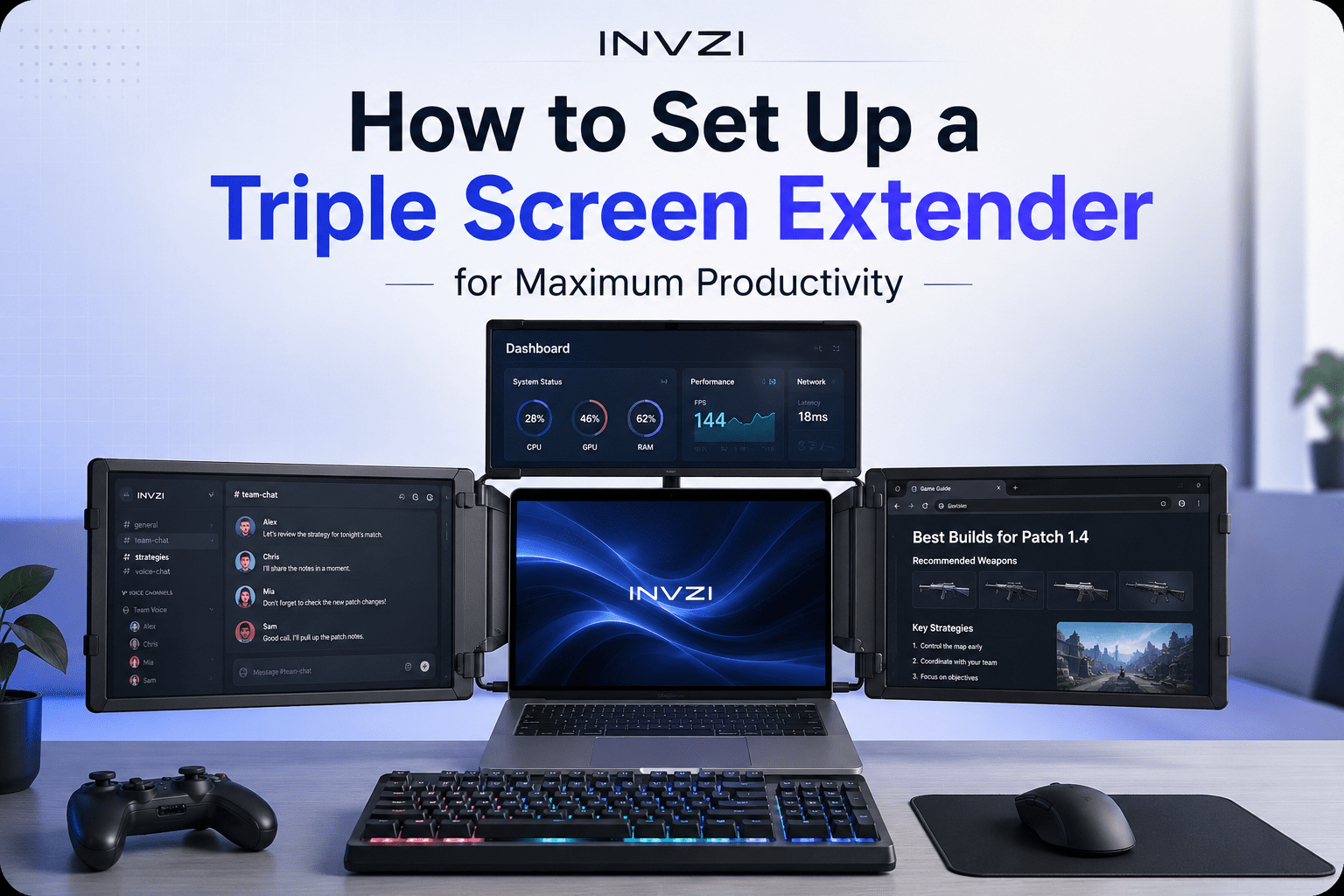
A practical gaming layout might look like this:
· Main screen: gameplay
· Left screen: Discord, team chat, or voice controls
· Right screen: maps, walkthroughs, builds, browser tabs, or music
· Top screen: OBS, Twitch chat, alerts, system stats, or notes
This makes the whole experience feel more organized. Instead of constantly switching windows, you can keep your most important tools visible while staying focused on the game.
1. More Screen Space Without a Full Desktop Setup
The most obvious benefit of a triple screen laptop extender is extra screen space. But for gamers, that space is not just about having a bigger display. It is about having the right information in the right place.
A single laptop screen can quickly feel cramped when you are gaming and multitasking. You may need Discord, Steam, Battle.net, Spotify, YouTube, Twitch, a browser guide, or GPU monitoring software open at the same time.
With a triple monitor laptop setup, you can give each task its own space. Your game stays clean and full-screen, while your supporting apps stay visible on the side. This is especially useful for gamers who use their laptop as both a gaming machine and an everyday workstation.
2. Less Alt-Tabbing During Gameplay
Alt-tabbing is one of the biggest frustrations of laptop gaming. It interrupts your focus, can slow down your workflow, and sometimes causes games to freeze, lag, or minimize incorrectly.
A triple screen extender helps reduce that problem. Instead of switching away from your game, you can glance at another screen.
For example:
· MMO players can keep raid guides, Discord, and damage meters visible.
· FPS players can monitor voice chat, tournament brackets, or team notes.
· RPG players can check maps, quests, and character builds.
· Co-op players can keep walkthroughs or puzzle hints open.
· Streamers can watch chat and alerts without minimizing the game.
The biggest advantage is flow. You stay in the game while everything else remains accessible.
3. A Better Setup for Streamers
Streamers often need more screen space than regular gamers. Running a stream from one laptop display can become messy because there are too many tools to manage at once.
A streamer may need:
· Gameplay
· OBS or Streamlabs
· Twitch or YouTube chat
· Alerts
· Scene controls
· Audio mixer
· Browser dashboard
· Music controls
· Notes or scripts
With one screen, these windows overlap. With a portable triple screen setup, you can separate them clearly.
You might keep the game on the main screen, OBS on the left screen, chat and alerts on the right screen, and your dashboard or notes on the top screen. This makes it easier to react to viewers, switch scenes, check audio levels, and manage the stream without awkward pauses.
For streamers who work from dorm rooms, apartments, hotels, gaming cafes, or temporary setups, a triple screen extender offers a flexible alternative to carrying multiple desktop monitors.
4. More Immersion for Sim Racing and Flight Games
A triple screen extender can also improve immersion, especially for sim racing, flight simulators, trucking games, space games, and cockpit-style experiences.
In these games, extra visual space can make the setup feel more like a control station. You can use additional screens for dashboards, telemetry, maps, navigation, chat, or reference information.
This is useful for games such as:
· Racing simulators
· Flight simulators
· Truck simulators
· Space exploration games
· Strategy games
· Open-world RPGs
Not every game will automatically stretch perfectly across multiple screens, so it is important to set realistic expectations. The strongest benefit is often not “make the game wider,” but “keep the game central while surrounding it with useful controls and information.”
That is what makes a triple screen extender feel like a gaming command center rather than just a bigger display.
5. Better Multitasking for MMO, RPG, and Strategy Players
Some gaming genres almost demand a second screen. MMO players need raid guides, class rotations, Discord calls, logs, and boss mechanics. RPG players may want maps, build planners, quest guides, or inventory references. Strategy players often use wikis, spreadsheets, or community guides.
A laptop screen extender makes these workflows easier.
Instead of switching between your game and a browser, you can keep everything open:
· Game in the center
· Build guide on one side
· Discord or voice chat on another
· Notes, timers, or tools on the top screen
This is especially helpful during high-pressure moments, such as raids, ranked matches, timed events, or co-op sessions where pausing is not an option.
6. A Portable Gaming Setup for Dorms, LAN Parties, and Travel
A traditional triple-monitor setup can be powerful, but it is not portable. You need several monitors, stands, power cables, a large desk, and a permanent gaming station.
A triple screen extender gives laptop gamers a more flexible option. It is easier to move than a full desktop monitor setup and can be used in smaller spaces.
This makes it useful for:
· College dorm rooms
· Small apartments
· LAN parties
· Gaming cafes
· Hotels
· Shared workspaces
· Temporary desks
· Travel gaming setups
It is best to think of it as a portable multi-screen workstation, not necessarily an ultra-light accessory. You still need to consider weight, cables, desk stability, and power. But compared with carrying multiple standalone monitors, a triple screen extender can make multi-screen gaming much more practical.
7. Great for Gaming Content Creation
Many gamers are also creators. They record gameplay, edit clips, make tutorials, upload YouTube videos, post TikToks, or create walkthroughs.
Editing content on one laptop screen can feel cramped. A triple screen extender gives you more room for the whole creative workflow.
For example:
· One screen for the editing timeline
· One screen for video preview
· One screen for folders and assets
· One screen for notes, scripts, or reference clips
This can make editing faster and more comfortable, especially after a long gaming session. You can move from playing to clipping, editing, and uploading without changing your entire setup.
For creators who travel or work from a laptop, this is one of the strongest reasons to consider a portable gaming monitor setup.
8. Useful for Esports Practice and Game Analysis
Competitive gaming is not only about playing matches. Serious players also review VODs, study strategies, compare stats, and analyze mistakes.
A triple screen extender can help esports players, coaches, and analysts work more efficiently.
You can use one screen for replay footage, another for notes, another for stats, and another for team chat or strategy documents. This setup is useful for games like Valorant, League of Legends, Counter-Strike 2, Apex Legends, Fortnite, Overwatch 2, and Dota 2.
Instead of switching between tabs, you can watch, compare, and take notes at the same time. For players trying to improve, that extra organization can make practice more focused.
9. More Than Gaming
Although a triple screen extender is a strong gaming accessory, it is also useful outside of gaming. The same setup can improve school, work, and creative productivity.
You can use it for:
· Remote work
· Online classes
· Coding
· Video editing
· Design work
· Research
· Writing
· Stock or crypto tracking
· Customer support
· Presentations
· Productivity apps
This makes it easier to justify the investment. You are not only buying more screens for gaming. You are creating a flexible laptop workstation that can support both entertainment and productivity.
For example, a student can use the screens for lectures, notes, and research during the day, then switch to gaming, Discord, and streaming at night.
What Gamers Should Check Before Buying a Triple Screen Extender
Before buying a triple screen extender for gaming, it is important to check compatibility and setup requirements. Not every laptop handles multiple external displays the same way.
Here are the most important things to review.
Laptop Compatibility
Check whether your laptop supports the required display output. Some screen extenders work through USB-C, USB-A, or a combination of both, but setup may vary depending on your laptop model.
Operating System Support
Windows and macOS may have different setup steps. Some devices may require a driver, while others may install automatically. Mac users should pay extra attention to system permissions and external display limitations.
Power Requirements
Some triple screen extenders need external power, especially models with a top screen. Before buying, check whether you need a PD charger, wall outlet, or power bank to run all screens properly.
Screen Size and Resolution
For gaming, screen size and clarity matter. A 16:10 display, for example, can offer extra vertical space for chat, guides, dashboards, and productivity tools. Always check the resolution and aspect ratio before buying.
Refresh Rate Expectations
Many portable monitors are designed for multitasking and productivity, not ultra-high-refresh esports gaming. If you require 144Hz or higher for competitive play, check the product specifications carefully.
Cable Management
Gamers care about clean setups. Look at how many cables are required, whether the product includes the right cables, and whether external power is needed.
Weight and Portability
A triple screen extender is more portable than a full triple-monitor desktop setup, but it still adds weight to your bag. Check the dimensions and weight if you plan to travel with it often.
Desk Space and Stability
Make sure your desk or table can support the laptop and extender comfortably. A stable back stand or support bracket is especially important for multi-screen use.
Who Should Use a Triple Screen Extender for Gaming?
A triple screen extender is especially useful for gamer
It is a strong fit for:
· Streamers who manage OBS, chat, alerts, and gameplay
· MMO players who need guides, Discord, and tools visible
· Sim racing and flight sim players who want a cockpit-style setup
· Competitive gamers who review stats, VODs, and strategies
· Gaming students who need one setup for school and entertainment
· Traveling gamers who cannot carry desktop monitors
· Content creators who edit clips, tutorials, and walkthroughs
· Remote workers who also game from the same laptop
It may not be necessary for every casual gamer. But for players who multitask, stream, create, compete, or travel, it can be a major upgrade.
FAQ
Is a triple screen extender good for gaming?
Yes. A triple screen extender can be very useful for gaming, especially if you want extra space for Discord, maps, guides, streaming tools, music, or system monitoring. It is especially helpful for streamers, MMO players, sim gamers, and multitasking laptop gamers.
Can I use a triple screen extender with a gaming laptop?
In many cases, yes. Most gaming laptops support external displays, but you should always check your ports, operating system, driver requirements, and power output before buying.
Do triple screen extenders affect FPS?
They can use some system resources, especially if you are running OBS, browsers, chat apps, and monitoring tools at the same time. Your actual FPS depends on your laptop’s GPU, CPU, game settings, display settings, and background apps. For best performance, close unnecessary programs and keep your main game on the most suitable display.
Can I play one game across all screens?
Some games and setups may support extended or multi-monitor gameplay, but not every game is designed for it. For most laptop gamers, the best use is to keep the game on the main screen and use the extra screens for chat, guides, streaming tools, maps, or performance stats.
Are triple screen extenders good for streaming?
Yes. A triple screen extender can be excellent for streaming because it lets you separate gameplay, OBS, chat, alerts, browser dashboards, and notes across multiple screens. This makes it easier to manage a live stream without constantly minimizing your game.
Conclusion
A triple screen extender does more than add extra displays to your laptop. It helps turn your gaming laptop into a more organized, flexible, and immersive command center.
For streamers, it keeps OBS, chat, and alerts under control. For MMO and RPG players, it keeps guides and Discord visible. For sim racers and flight sim fans, it creates a more cockpit-like setup. For content creators, it makes editing and publishing easier. And for students or travelers, it offers multi-screen power without a permanent desktop station.
If you want a cleaner, more efficient, and more flexible gaming laptop setup, a triple screen extender for gaming is one of the most useful upgrades to consider.

Leave a comment
This site is protected by hCaptcha and the hCaptcha Privacy Policy and Terms of Service apply.