


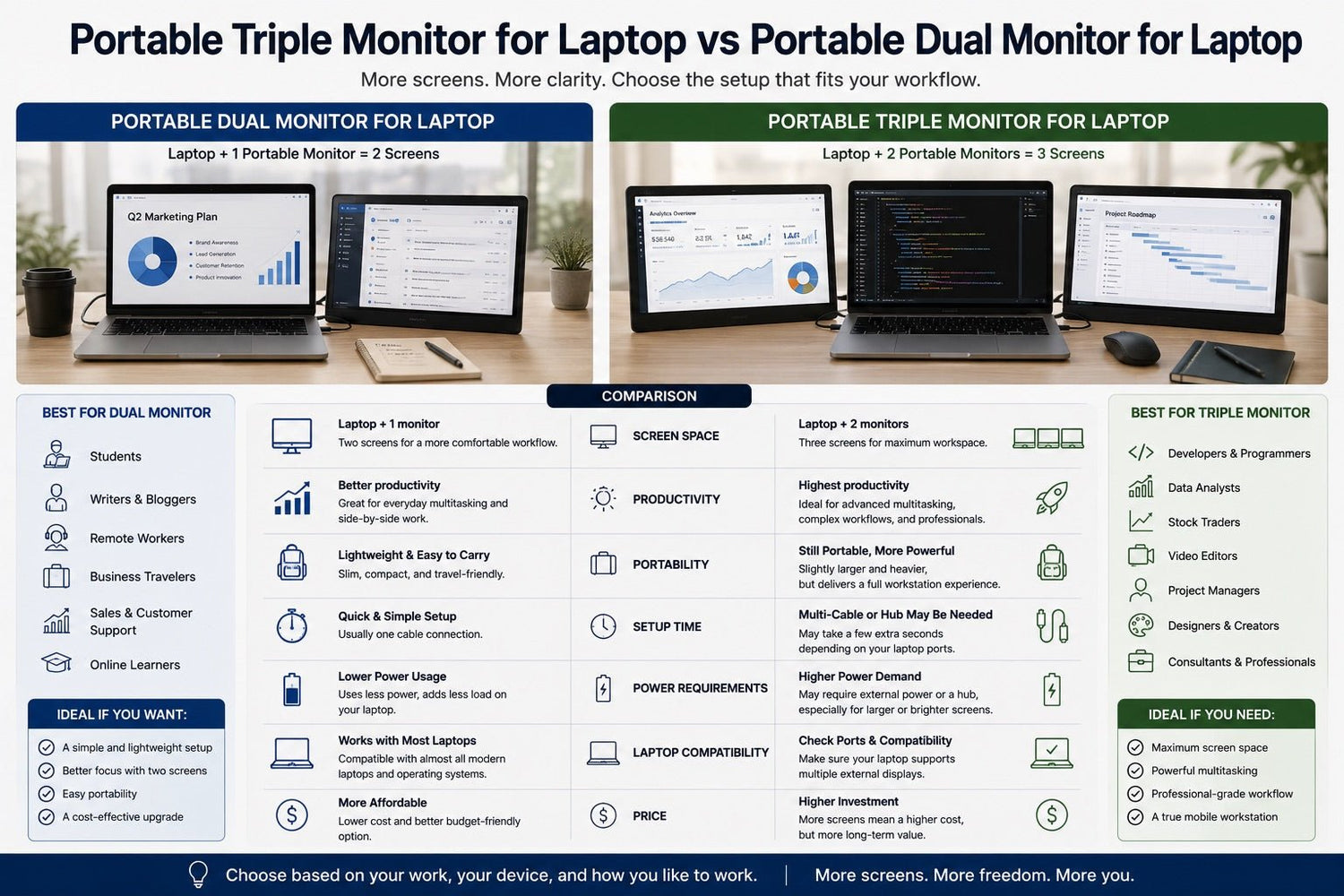
Working from a laptop is convenient, but one small screen can quickly become a productivity bottleneck. Whether you are switching between spreadsheets, video calls, dashboards, design tools, emails, or browser tabs, a single laptop display often forces you to waste time moving windows around.
That is why more professionals are comparing portable triple monitor for laptop vs portable dual monitor for laptop setups. Both options can turn your laptop into a more powerful workstation, but they are designed for different types of users.
A portable dual monitor for laptop usually adds one extra screen to your laptop. It is simple, lightweight, and easy to carry.
A portable triple monitor for laptop usually adds two extra screens, creating a three-screen laptop setup. It is better for heavy multitasking, professional workflows, and users who want a desktop-like experience anywhere.
So which one is right for you? Let’s compare both options in detail.
Quick Answer: Which One Should You Choose?
| Choose This | Best For |
|---|---|
| Portable Dual Monitor for Laptop | Students, writers, salespeople, remote workers, travelers, and users who mainly need two screens |
| Portable Triple Monitor for Laptop | Developers, analysts, traders, content creators, project managers, consultants, and heavy multitaskers |
Choose a portable dual monitor if you want a simple and lightweight productivity upgrade.
Choose a portable triple monitor if you want maximum screen space and a full mobile workstation.
What Is a Portable Dual Monitor for Laptop?
A portable dual monitor for laptop setup gives you two working screens: your laptop screen plus one additional portable monitor.
This setup is popular because it is easy to use and works well for everyday productivity. Instead of constantly switching between windows, you can keep two important tasks visible at the same time.
For example, you can use one screen for:
- Writing a document
- Joining a video call
- Editing a spreadsheet
- Managing email
- Viewing a presentation
- Researching online
And use the second screen for:
- Notes
- Reference materials
- Chat apps
- Browser tabs
- CRM tools
- Preview windows
A portable dual monitor is ideal for users who want more space without adding too much weight or complexity.
The main limitation is that one extra screen may still not be enough if your work involves several apps, dashboards, or documents at the same time.
What Is a Portable Triple Monitor for Laptop?
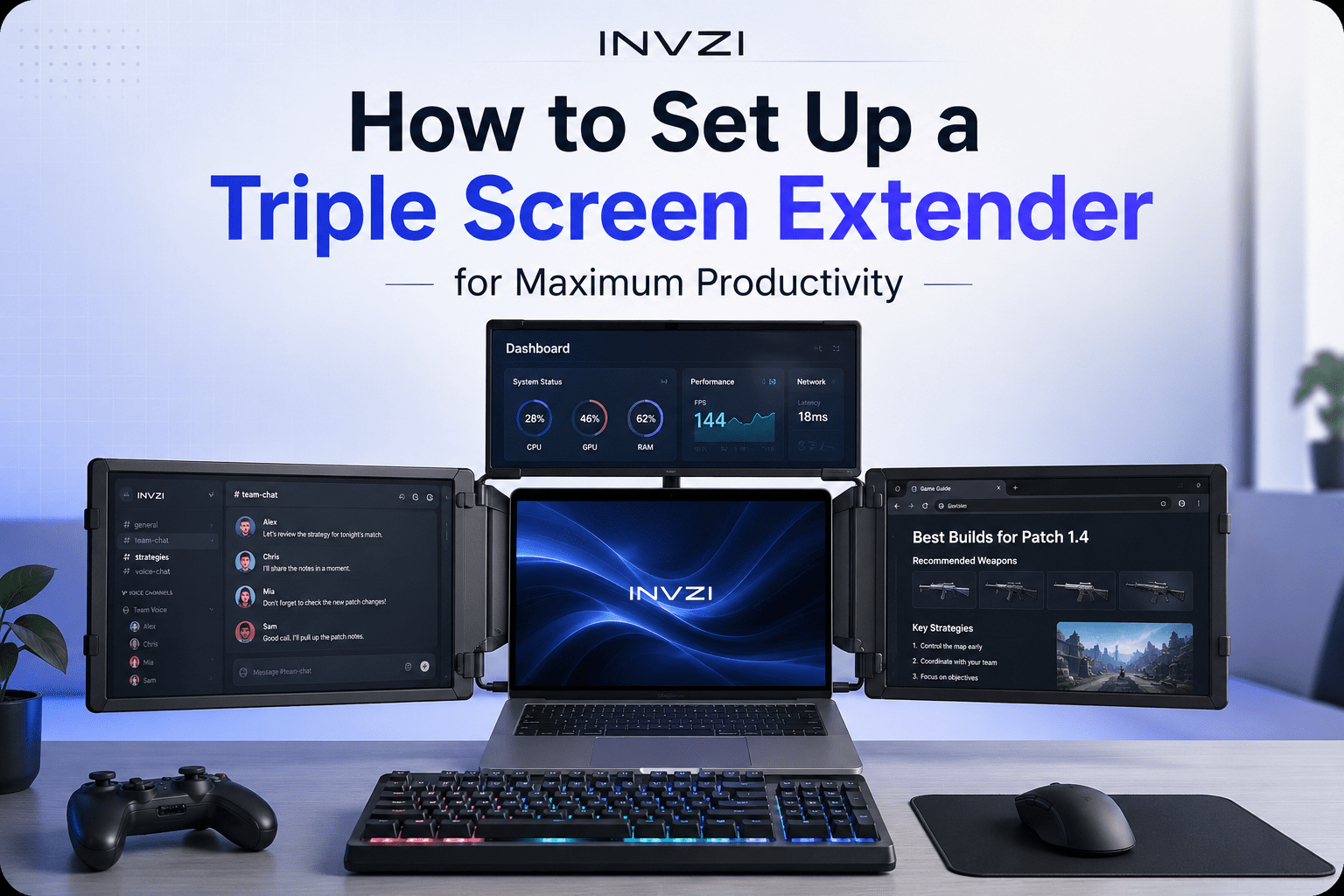
A portable triple monitor for laptop setup gives you three working screens: your laptop screen plus two additional portable monitors.
This creates a true mobile workstation. Instead of working with only one or two windows, you can organize your workflow across three screens.
For example, a software developer might use:
- Main screen for coding
- Second screen for documentation
- Third screen for terminal, browser preview, or Slack
A financial analyst might use:
- Main screen for spreadsheets
- Second screen for dashboards
- Third screen for charts, reports, or market news
A project manager might use:
- Main screen for a video meeting
- Second screen for project management tools
- Third screen for notes, documents, or calendar
A portable triple monitor for laptop is designed for people who need to see more, compare more, and switch less.
The trade-off is that triple monitor setups are usually heavier, more expensive, and may require more attention to laptop compatibility, ports, power, and desk space.
Portable Triple Monitor vs Portable Dual Monitor: Key Differences
1. Screen Space
The biggest difference is screen space.
A portable dual monitor gives you one extra display, which is enough for two-window workflows. For example, you can write on one screen while researching on the other.
A portable triple monitor gives you two extra displays, which is better for complex workflows. You can keep your main task, reference materials, and communication tools open at the same time.
If you often feel like two screens are still not enough, a triple screen laptop setup is the stronger choice.
2. Productivity
Both setups improve productivity, but in different ways.
A portable dual monitor helps you work more comfortably by reducing basic window switching. It is great for daily office work, online meetings, writing, studying, and browsing.
A portable triple monitor helps you manage multiple workflows at once. It is better for users who need to monitor data, compare documents, review creative assets, or work across several apps.
For light multitasking, dual is enough.
For serious multitasking, triple is better.
3. Portability
A portable dual monitor for laptop is usually easier to carry. It is a good choice for frequent travelers, students, and people who work from cafés, coworking spaces, or classrooms.
A portable triple monitor for laptop is still portable, but it usually takes up more bag space and may weigh more. It is better for users who want a serious workstation while traveling and are willing to carry a larger setup.
If portability is your top priority, choose dual.
If productivity is your top priority, choose triple.
4. Setup Time
A portable dual monitor is usually faster to set up. In many cases, you only need one cable.
A portable triple monitor may take slightly longer because it has two additional screens. Depending on the model, you may need multiple cables, a hub, or external power.
That said, a well-designed laptop screen extender can still make setup quick and simple.
5. Power Requirements
A dual monitor setup usually needs less power because it only adds one screen.
A triple monitor setup may require more power, especially if the screens are large, bright, or high-resolution. Some setups can draw power from the laptop, while others may need an external power source.
Before buying, check whether the monitor can run through USB-C or whether it needs extra power.
6. Laptop Compatibility
Compatibility is important for both setups, but it is especially important for triple monitors.
Before buying any portable monitor for laptop, check:
- Does your laptop support video output through USB-C?
- Does your USB-C port support DisplayPort Alt Mode?
- Does your laptop support multiple external displays?
- Do you need HDMI, USB-C, Thunderbolt, or DisplayLink?
- Does your laptop have enough ports?
- Will you need a docking station or hub?
Not every USB-C port supports video output. This is one of the most common mistakes buyers make.
7. Price
A portable dual monitor is usually more affordable. It is a great entry-level upgrade for people who want more screen space without spending too much.
A portable triple monitor costs more, but it delivers a much bigger productivity upgrade. For professionals who rely on multitasking every day, the extra screen space can be worth the investment.
Pros and Cons: Portable Dual Monitor for Laptop
Pros
- Lightweight and easy to carry
- Usually more affordable
- Faster to set up
- Great for travel
- Good for students and remote workers
- Uses less power
- Simple cable management
Cons
- Limited screen space compared with triple monitors
- Not ideal for heavy multitasking
- May still require frequent window switching
- Less suitable for dashboards, coding, trading, or creative workflows
Pros and Cons: Portable Triple Monitor for Laptop
Pros
- Maximum screen space
- Great for heavy multitasking
- Creates a desktop-like workstation
- Ideal for professional users
- Reduces window switching
- Better for comparing data, documents, and dashboards
- Useful for coding, trading, editing, and project management
Cons
- Usually heavier than dual monitor setups
- Costs more
- May need more power
- Requires more desk space
- Compatibility is more important
- Setup may take slightly longer
Full Comparison Table
| Feature | Portable Dual Monitor for Laptop | Portable Triple Monitor for Laptop |
|---|---|---|
| Screen setup | Laptop + 1 extra screen | Laptop + 2 extra screens |
| Best for | Simple multitasking | Heavy multitasking |
| Portability | Lighter and easier to carry | More powerful but heavier |
| Setup time | Faster | Slightly longer |
| Productivity boost | Good | Excellent |
| Price | Usually lower | Usually higher |
| Power needs | Lower | Higher |
| Compatibility | Important | Very important |
| Best users | Students, writers, sales, remote workers | Developers, analysts, traders, creators, managers |
| Workspace feel | Better laptop setup | Full mobile workstation |
| Main benefit | Simple extra screen | Maximum screen space |
| Main drawback | Limited for complex workflows | More weight and cost |
Which Setup Is Better for Travel?
For travel, a portable dual monitor for laptop is usually the better choice if you want something light, compact, and quick to set up.
It is ideal for:
- Business trips
- Coffee shop work
- Coworking spaces
- Classrooms
- Hotel rooms
- Short-term remote work
However, a portable triple monitor for laptop is better if you need a full workstation while traveling. For example, if you are a founder, consultant, developer, analyst, or content creator, the extra screen space may be worth the added weight.
Choose dual for lightweight travel.
Choose triple for serious work while traveling.
Which Setup Is Better for Productivity?
If your work is simple, a portable dual monitor may be enough. It gives you space for two tasks at once, such as a document and a browser.
But if your work involves multiple apps, live data, creative tools, or real-time communication, a portable triple monitor is more productive.
A triple monitor setup helps you:
- Compare information faster
- Keep communication tools visible
- Monitor dashboards in real time
- Separate tasks by screen
- Reduce tab switching
- Stay focused longer
For basic productivity, dual is good.
For professional productivity, triple is better.
Best Use Cases by Profession
| Profession | Recommended Setup | Why |
|---|---|---|
| Student | Portable dual monitor | Great for notes, research, and online classes |
| Writer | Portable dual monitor | Useful for drafting and referencing sources |
| Sales professional | Portable dual monitor | Good for CRM, calls, and email |
| Remote worker | Portable dual monitor | Simple upgrade for everyday tasks |
| Software developer | Portable triple monitor | Better for code, docs, terminal, and preview |
| Financial analyst | Portable triple monitor | Ideal for spreadsheets, dashboards, and reports |
| Trader | Portable triple monitor | Useful for charts, news, and live data |
| Project manager | Portable triple monitor | Great for meetings, task boards, and notes |
| Content creator | Portable triple monitor | Better for editing, preview, assets, and scripts |
| Consultant | Portable triple monitor | Useful for client calls, decks, notes, and research |
Common Mistakes Before Buying a Laptop Screen Extender
1. Assuming Every USB-C Port Supports Display
Not all USB-C ports support video output. Some only support charging or data transfer. Always check whether your laptop supports DisplayPort Alt Mode, Thunderbolt, or external display output.
2. Ignoring Multiple Display Support
Some laptops can support one external monitor but not two. This matters if you are buying a portable triple monitor for laptop.
3. Forgetting About Power Requirements
Extra screens need power. A triple monitor setup may drain your laptop battery faster or require external power.
4. Choosing the Largest Screen Without Considering Weight
A larger screen is great for productivity, but it can make your setup heavier. Balance screen size with portability.
5. Not Checking Desk Space
Portable monitors are designed for mobility, but you still need enough desk space. A triple screen laptop setup may not be ideal for very small tables.
6. Overlooking Cable Management
A good portable setup should be clean and easy to connect. Too many cables can make the setup frustrating.
7. Buying Based on Price Only
The cheapest option is not always the best. Check screen quality, brightness, resolution, stand stability, compatibility, and build quality.
Buying Guide: What to Check Before Choosing
Laptop Compatibility
This is the most important factor. Make sure your laptop can support the monitor setup you want.
For a portable dual monitor, one external display output may be enough.
For a portable triple monitor, your laptop must support two external displays or use a compatible DisplayLink solution.
Screen Size
Common portable monitor sizes include 14-inch, 15.6-inch, 16-inch, and larger options.
Smaller screens are easier to carry. Larger screens are better for long work sessions and professional multitasking.
Resolution
Full HD is enough for most users. Higher resolution may be better for design, editing, coding, and detailed spreadsheet work.
Brightness
If you work in bright rooms, cafés, airports, or coworking spaces, choose a monitor with good brightness. A dim screen can make work uncomfortable.
Stand and Mounting Design
A stable stand or mounting system is important. The monitor should stay secure while you type, adjust angles, or move your laptop.
Weight
For daily travel, lighter is better. For serious workstation use, a slightly heavier triple monitor setup may be worth it.
Ports and Cables
Check whether the monitor uses USB-C, HDMI, Thunderbolt, or DisplayLink. Also check whether cables are included.
Power Supply
Some portable monitors draw power from your laptop. Others require external power. For triple monitor setups, power planning is especially important.
Final Verdict: Portable Triple Monitor for Laptop vs Portable Dual Monitor for Laptop
When comparing portable triple monitor for laptop vs portable dual monitor for laptop, the best choice depends on your work style.
A portable dual monitor for laptop is best if you want a lightweight, simple, and affordable productivity upgrade. It is perfect for students, writers, salespeople, remote workers, and travelers who mainly need one extra screen.
A portable triple monitor for laptop is best if you want a full mobile workstation. It is ideal for developers, analysts, traders, project managers, content creators, consultants, and professionals who work with multiple apps at the same time.
Choose a portable dual monitor if you want convenience.
Choose a portable triple monitor if you want maximum productivity.
For simple multitasking, dual is enough.
For serious work anywhere, triple is the better choice.
FAQs
1. Is a portable triple monitor for laptop worth it?
Yes. A portable triple monitor for laptop is worth it if you often work with multiple apps, documents, dashboards, or browser tabs at the same time. It is especially useful for developers, analysts, traders, content creators, and project managers.
2. Is a portable dual monitor enough for remote work?
Yes, a portable dual monitor is enough for many remote workers. It works well for video calls, notes, email, research, and basic multitasking. However, heavy multitaskers may prefer a triple monitor setup.
3. Does every laptop support a portable triple monitor?
No. Not every laptop supports two external displays. Before buying, check your laptop’s USB-C, HDMI, Thunderbolt, DisplayPort Alt Mode, or DisplayLink compatibility.
4. Which is better for travel: portable dual monitor or portable triple monitor?
A portable dual monitor is usually better for lightweight travel. A portable triple monitor is better if you need a full workstation while working from hotels, coworking spaces, or client offices.
5. What is the difference between a dual screen laptop setup and a triple screen laptop setup?
A dual screen laptop setup includes your laptop screen plus one extra screen. A triple screen laptop setup includes your laptop screen plus two extra screens. Dual is simpler and lighter, while triple gives you more space for multitasking.
6. Who should buy a portable dual monitor for laptop?
Students, writers, sales professionals, teachers, casual remote workers, and frequent travelers should consider a portable dual monitor. It is simple, lightweight, and practical.

Leave a comment
This site is protected by hCaptcha and the hCaptcha Privacy Policy and Terms of Service apply.